

Sony Bravia Series TVs are renowned for their stunning picture quality, deep blacks, and excellent upscaling. However, when you try to play high‑efficiency 4K H.265 (HEVC) movies directly from a USB drive or external hard disk, you may occasionally encounter the dreaded “unsupported file format” or “audio not playing” errors. Why does this happen, and more importantly, how can you fix it? In this guide, we will explain the compatibility challenges and recommend three software solutions, with a strong focus on the best 4K Video Converter for TV – Acrok Video Converter Ultimate. We will also look at HandBrake and OnlineConverter, highlighting their weaknesses so you can make an informed choice.
Why Sony Bravia TVs May Refuse to Play 4K H.265 Files
Sony Bravia TVs (including Android TV models like X80K, X90L, A80L, and A95L) support many video codecs, but not every container or profile of H.265 is accepted. Common issues include:
- Unsupported container – Your file is MKV, but the TV prefers MP4.
- Audio codec mismatch – The movie uses DTS or TrueHD audio, which Sony Bravia often cannot decode.
- High bitrate or level – Some 4K H.265 files exceed the TV’s hardware limit (e.g., Level 6.0 vs. supported Level 5.1).
- Missing HDR metadata – Sony Bravia’s HDR engine requires specific metadata.
To solve these problems, you need a reliable TV Format Converter that can re‑encode or remux your 4K H.265 movies into a Sony‑friendly configuration.
Recommended Software to Convert 4K H.265 for Sony Bravia
After testing multiple tools, here are three options – one excellent, two with notable drawbacks.
1. Acrok Video Converter Ultimate – The Best 4K Video Converter for TV
Why Acrok is my top recommendation:
Acrok Video Converter Ultimate is designed specifically for users who need hassle‑free conversion of high‑resolution, high‑efficiency videos. It works perfectly as a format converter for Sony TV because it offers:
- Built‑in Sony Bravia presets – Simply choose “Sony TV” or “Sony Bravia 4K” as your output device, and Acrok automatically selects the optimal container (MP4), video codec (H.265 or H.264), audio codec (AAC or AC3), and resolution.
- GPU accelerated encoding – Converts a 2‑hour 4K H.265 movie in under 30 minutes (vs. 2+ hours with software‑only encoders).
- Preserves HDR10/HLG – Retains the dynamic range that makes Sony Bravia’s panel shine.
- Batch conversion & editing – Trim unwanted parts, add subtitles, or adjust volume without re‑encoding the whole file.
- Lossless remux option – If your original file is already H.265 but in a wrong container (e.g., MKV), Acrok can repack it to MP4 in seconds without quality loss – this is a true H.265 Converter for TV that saves time.
Supported outputs: MP4, MOV, MKV, AVI, and over 200 more. For Sony Bravia, MP4 with H.265 + AAC is bulletproof.
2. HandBrake – Powerful but Complex for Beginners
HandBrake is a free, open‑source transcoder. It can convert 4K H.265 movies, but it is not an ideal TV Format Converter for average users.
Disadvantages of HandBrake for Sony Bravia users:
- No device‑specific presets for Sony TV – You must manually understand codec levels, audio formats, and container settings. One wrong setting and the file still won’t play.
- Slow on 4K H.265 – HandBrake’s software encoding is extremely CPU‑intensive. Without proper GPU acceleration (it supports limited hardware encoding on some platforms), a 4K movie can take 5–8 hours.
- No remux mode – HandBrake always re‑encodes, even when the video codec is already compatible. This wastes time and reduces quality.
- Intimidating interface – Hundreds of parameters (constant rate factor, reference frames, profile/level) confuse non‑technical users.
While HandBrake is free, the steep learning curve and long conversion times make it a poor 4K Video Converter for TV for anyone who is not a video expert.
3. OnlineConverter (generic web‑based tool) – Not for 4K
OnlineConverter is a typical website that converts small video files using cloud servers. It is not recommended for 4K H.265 movies at all.
Disadvantages of OnlineConverter:
- File size limit – Most free online tools cap uploads at 500MB or 1GB. A typical 4K H.265 movie is 20–80GB.
- Extremely slow – Uploading and downloading tens of gigabytes over a home internet connection takes hours, if it even succeeds.
- Privacy risk – You are uploading a possibly copyrighted movie to an unknown server.
- Poor H.265 support – Many online converters either downscale 4K to 1080p or strip HDR information.
- No control over audio – You cannot force AAC or adjust bitrate, so the output may still have DTS audio (which Sony Bravia does not play).
OnlineConverter is fine for a 10‑second clip, but it is completely unsuitable as a serious H.265 Converter for TV for 4K movies.
How to Use Acrok Video Converter Ultimate – Step by Step
If you want a stress‑free solution, follow these steps:
1. Download and install Acrok Video Converter Ultimate from the official website (Windows or Mac).
2. Launch the software and click “Add Files” – load your 4K H.265 MKV or MOV file.
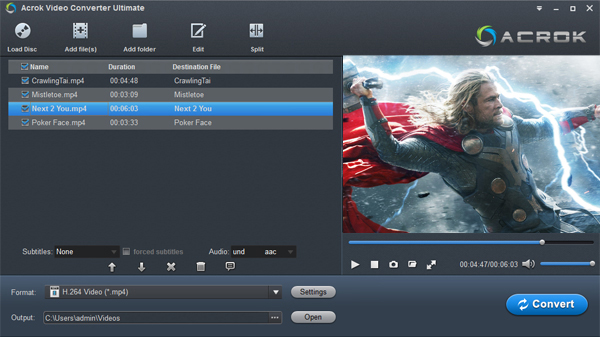
3. Select the output format – Click the format drop‑down and go to “Device” > “Sony” > “Sony Bravia 4K TV (H.265 + AAC)”. This is the magic preset that ensures perfect playback.

4. Optional adjustments – Trim start/end, crop black bars, add external subtitles, or choose a different audio track.
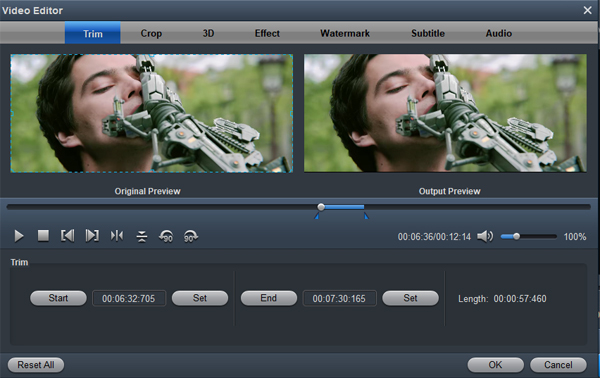
5. Choose destination folder – Make sure you have enough free space (at least twice the file size).
6. Click “Convert” – Acrok will use GPU acceleration (NVIDIA/AMD/Intel) for lightning‑fast conversion. A 30GB 4K movie finishes in 20–40 minutes.
7. Copy the output MP4 file to a USB 3.0 drive formatted as exFAT or NTFS, plug it into your Sony Bravia’s USB port, and enjoy.
Key Takeaways – Which Tool Should You Choose?
| Feature | Acrok Video Converter Ultimate | HandBrake | OnlineConverter |
|---|---|---|---|
| Sony Bravia preset | ✅ Yes | ❌ No | ❌ No |
| Speed for 4K H.265 | Fast (GPU) | Very slow | Impractical |
| Remux (no re‑encode) | ✅ Yes | ❌ No | ❌ No |
| Preserves HDR | ✅ Yes | Manual only | ❌ Often lost |
| Easy to use | ✅ Very | ❌ Complex | ⚠️ Simple but limited |
| Supports large 4K files | ✅ Yes | ✅ Yes | ❌ No (size limit) |
Final Recommendation
For most Sony Bravia owners, the clear winner is Acrok Video Converter Ultimate. It truly excels as a format converter for Sony TV because it removes all guesswork – one click gives you a perfectly playable 4K H.265 MP4 file. While HandBrake is free, its complexity and slow encoding make it frustrating for casual users. OnlineConverter is simply not designed for 4K video.
If you frequently watch 4K H.265 movies on your Sony Bravia, investing in a dedicated 4K Video Converter for TV like Acrok will save you hours of trial and error. And if you ever need an H.265 Converter for TV for other brands (LG, Samsung, TCL), Acrok’s device presets cover them too.
Enjoy your Sony Bravia Series TV with seamless 4K H.265 playback!

No responses yet